WooCommerce plugin · free
Fiscalize a WooCommerce shop in Serbia, no device and no code
Install the BokaPOS plugin, enter the credential and map your tax classes once. From then on every order gets a Tax Administration fiscal receipt: PFR number, QR code, verification link and PDF, on the order screen and in the customer's e-mail.
- Always free, no extra charge
- Approved ESIR · IB 1656
- WordPress 6.5+ · WooCommerce 8.9+ · HPOS
Download the plugin (ZIP, v1.0.0). Upload the ZIP in WordPress: Plugins, Add New, Upload Plugin. Updates arrive through WordPress like for any other plugin.
What the plugin does
Everything a Serbian web shop has to do with a fiscal receipt, inside the WooCommerce screens you already use.
One-click or automatic fiscalization
From the order screen, as a bulk action on the orders list, or automatically at the status you choose (Completed recommended).
Refunds from the WooCommerce panel
Line-aware partial refunds, required buyer identification and the signed copy when cash is returned.
Advance chains
Advance receipt when the money arrives, advance refund and final receipt at delivery, for the gateways you mark as prepaid.
Copies, proforma and training
Issued from the order screen, without leaving WordPress. A copy is available for the final receipt of an advance chain too.
Receipt delivery
WooCommerce e-mail with the PDF attached, BokaPOS platform e-mail, the order-received page and My Account. The customer picks A4, 80 mm or 58 mm.
Company PIB at checkout
A PIB field in classic and block checkout; the buyer identification prints on the receipt and the registered company name arrives with it.
Journal and turnover report
Local fiscal journal, BokaPOS journal search, CSV export and turnover by period, all inside WordPress.
Catalogue and languages
Optional product synchronization with BokaPOS. Interface in Serbian (Latin) and English.
Setup in five steps
You issue the first test receipt the same day in the free sandbox. Production switches on once the taxpayer's security element is activated.
Connection
WooCommerce, BokaPOS, Connection tab. Enter the sandbox client id and secret, click Test connection, choose the taxpayer and business premise.
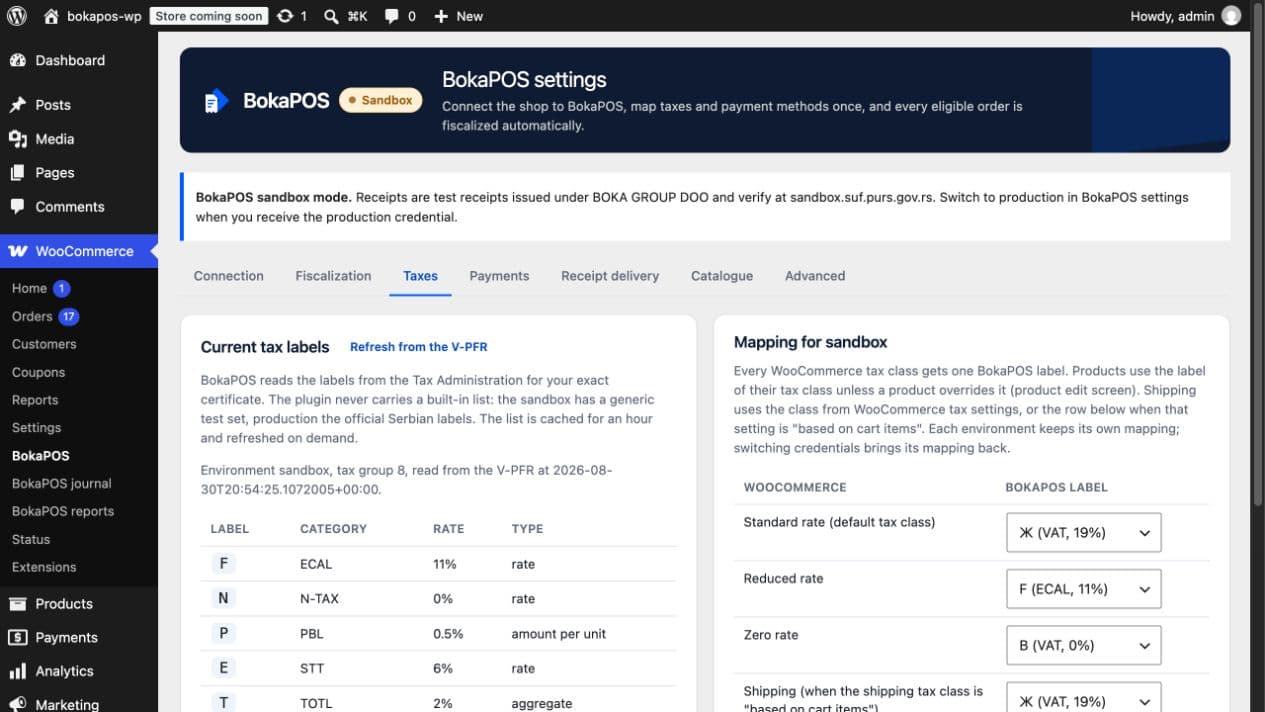
Taxes
The plugin reads the tax labels live from the V-PFR. Map every WooCommerce tax class to a label, plus the shipping and fee rows. A taxpayer outside the VAT system maps everything to the non-VAT label.
Payments
The plugin proposes a payment type per gateway: cash on delivery is cash, bank transfer is wire transfer, card gateways are payment card. Adjust as needed.
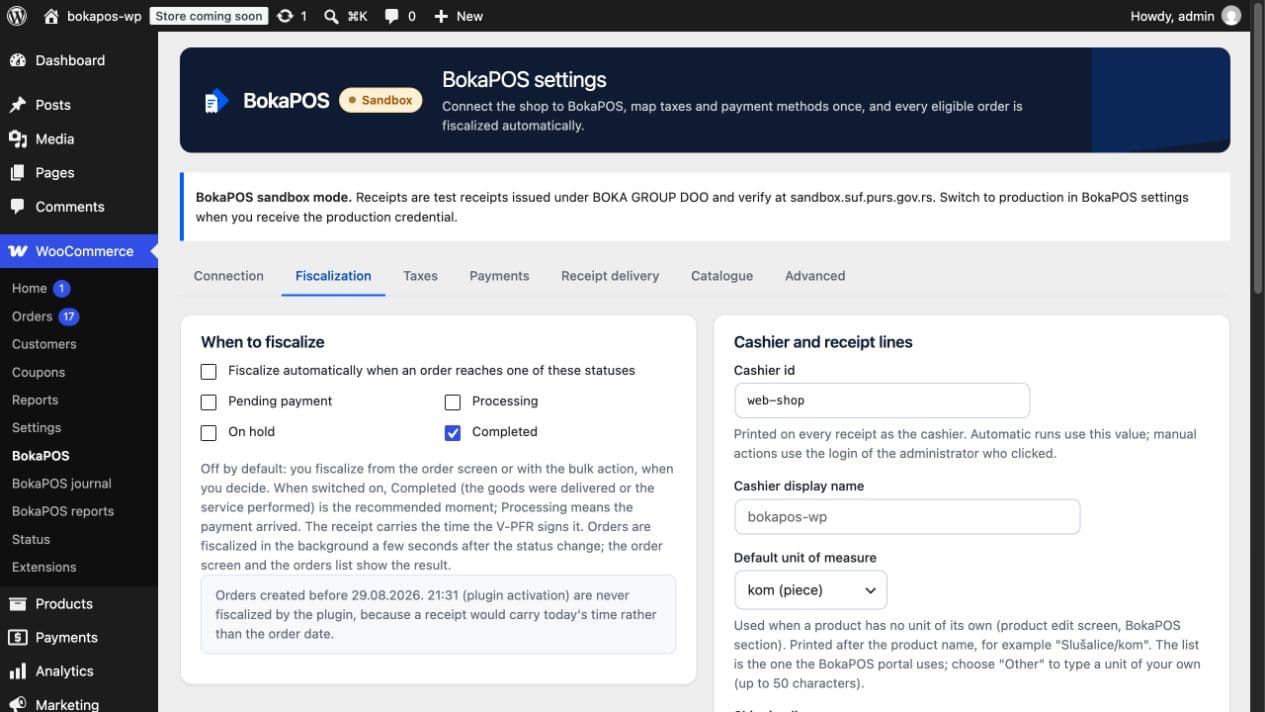
Fiscalization
Manual by default. If you switch automatic fiscalization on, pick the status; the tab warns when a payment method takes the money before delivery and explains how an advance settles it.
Receipt delivery
Switch on the e-mail with the PDF, the receipt block on the thank-you page and in My Account, and the PIB field at checkout.
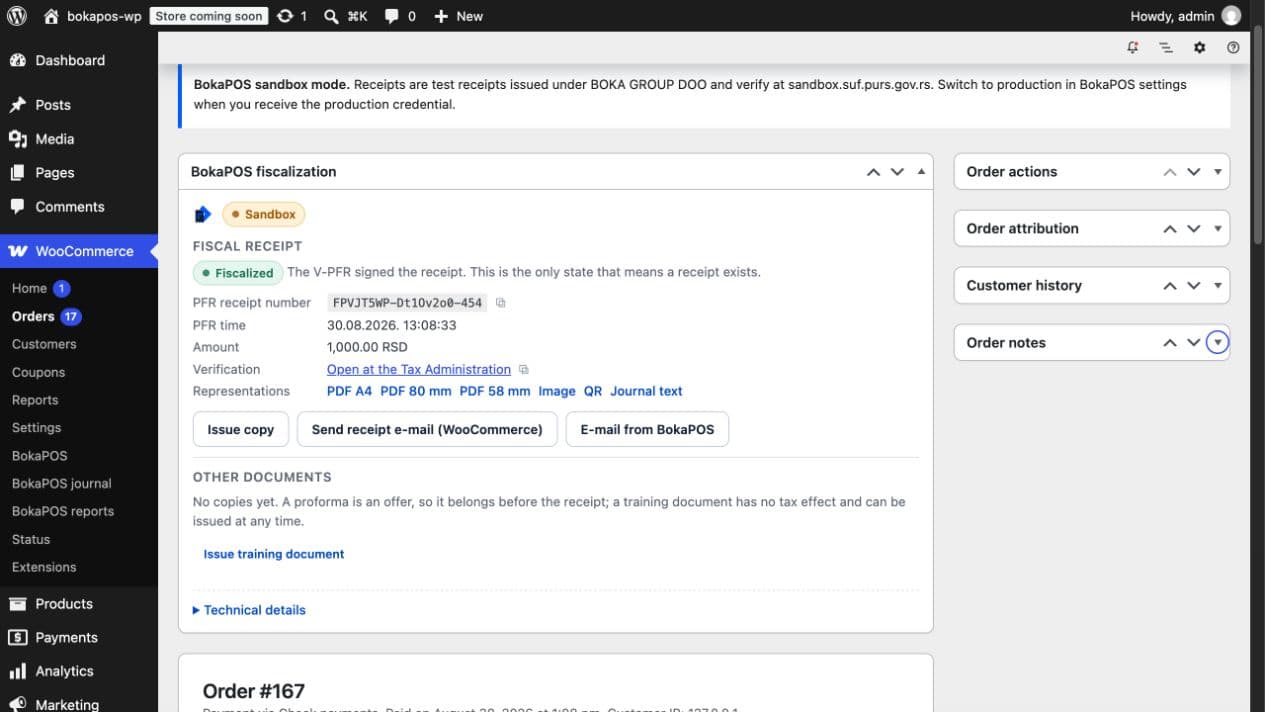
Then place a test order. The order screen shows the BokaPOS fiscalization box with the status, PFR number, verification link and PDF.
Rules the plugin follows
A fiscal receipt is a legal document, so the plugin would rather stop and ask than guess.
- A receipt exists only when BokaPOS answers 201 with
fiscalized: true. Nothing else counts: not a scheduled job, not an e-mail, not a PDF. - Every request carries an idempotency key stored before sending, so a network problem can never produce two receipts for one order.
- Unknown outcomes are never resent; the plugin checks the result with BokaPOS and tells you when a person needs to decide.
- Tax labels are read live from the V-PFR through BokaPOS; no rate is hard-coded.
- Orders created before the plugin was activated are never fiscalized, because the receipt would carry today's time.
- Sandbox and production credentials are isolated; a sandbox key in the production slot is rejected before it is stored.
- An order in a foreign currency, a tax-free line mapped to 20% or a discount larger than its line is refused rather than fiscalized wrongly.
Requirements
- WordPress
- 6.5 or newer, tested up to 7.1
- WooCommerce
- 8.9 or newer, tested up to 11.0
- PHP
- 8.1 or newer
- Order storage
- legacy and HPOS
- Background work
- the Action Scheduler bundled with WooCommerce
- Account
- a BokaPOS account; the sandbox is free
- License
- GPLv2 or later, open source
- Version
- 1.0.0, released 2 September 2026
What the plugin sends, and to whom
After an administrator enters the credential, the plugin contacts auth.bokapos.rs (access token) and api.bokapos.rs (connection checks, fiscalization, receipt representations, catalogue, journal, reports). Fiscalization sends the order's line items, amounts, payment type and optional buyer identification so BokaPOS can issue the merchant's receipt through the V-PFR. No analytics or advertising data is sent. Receipt PDFs and images are not stored as local files; they are fetched from BokaPOS when needed.
The plugin is free and stays free
No extra charge, no premium version, no per-site fee. You pay only the BokaPOS subscription for production: 1.600 RSD per month per production security element, 600 fiscalized documents per month included, 1 RSD per additional document, VAT included. The sandbox is free and never blocked.
For developers
The plugin follows WooCommerce conventions: wc_get_order() and the order meta API, HPOS, Action Scheduler for background work, templates a theme can override.
- Constants in
wp-config.php:BOKAPOS_ENVIRONMENT,BOKAPOS_SANDBOX_CLIENT_ID,BOKAPOS_SANDBOX_CLIENT_SECRET,BOKAPOS_PRODUCTION_CLIENT_ID,BOKAPOS_PRODUCTION_CLIENT_SECRET. - Filters:
bokapos_order_items,bokapos_order_buyer,bokapos_client_reference,bokapos_order_eligibility_problem,bokapos_validate_pib_checksum,bokapos_order_paymentsfor split payments. - Actions:
bokapos_order_fiscalized,bokapos_refund_fiscalized,bokapos_advance_fiscalized. - Theme templates under
bokapos-for-woocommerce/:order-receipt.php,emails/bokapos-receipt.php,emails/plain/bokapos-receipt.php.
Frequently asked questions about WooCommerce fiscalization
Is the plugin really free?
Yes. The plugin is free and stays free, with no extra charge, no premium version and no per-shop fee. You pay only the BokaPOS subscription for production receipts; the sandbox is free.
Do I need a fiscal cash register, printer or L-PFR?
No. BokaPOS is a cloud ESIR that fiscalizes through the Tax Administration's virtual fiscal processor (V-PFR). All you need is the file-based security element the taxpayer receives from the Tax Administration for distance selling.
Does the plugin fiscalize orders created before it was installed?
No. A receipt carries the time the V-PFR signs it, so old orders would receive today's time. Only orders created after activation are fiscalized.
What happens when the V-PFR is down?
Nothing is issued. The plugin repeats the same request with the same key a few times with growing delays (5 s, 30 s, 2 min, 10 min, 30 min, 60 min); if the service stays down it flags the order and e-mails the administrator. A single Retry button repeats the same request.
What does Outcome being checked mean?
The request may have reached the V-PFR but the answer did not come back. The plugin never sends it again; it asks BokaPOS for the result periodically and finishes the order as soon as the result is known. Do not fiscalize the order again by hand.
Can a refund be fiscalized without the buyer's identity number or PIB?
No. The regulations require buyer identification on every refund. The refund panel asks for it: identity card number, company PIB, passport and the other official kinds.
Does it support cash on delivery, cards, bank transfer and instant payments?
Yes. The plugin maps WooCommerce gateways to all seven official payment types: cash (cash on delivery), payment card, check, wire transfer, voucher, instant payment and other non-cash payment. Split payments are possible through a filter.
Does it work with HPOS and block checkout?
Yes. The plugin uses the WooCommerce order API, so it works with legacy storage and HPOS, and the PIB field exists in both classic and block checkout.
Is the plugin on WordPress.org?
Yes. The plugin was published in the WordPress.org directory on 7 September 2026, so you install it from the WordPress admin like any other plugin or download it from the directory page. The ZIP on this page still works; updates for both kinds of installation arrive through WordPress.
How do I go to production?
The taxpayer's authorized person requests the security element on the Tax Administration portal, the Owner uploads it in the BokaPOS portal, BokaPOS activates it and issues the production credential. Enter it in the Connection tab, map the tax classes again (production has different labels) and verify the first receipt on the Tax Administration site.
Ready to fiscalizefrom your own system?
The sandbox is free, and you issue your first receipt the same day.